The MyLibrary! app is currently in maintenance mode, and is no longer available for download. The app is no longer being updated or enhanced. While we investigate this issue, all users can connect directly to our catalogue https://search.virl.bc.ca.
Catalogue Tips
Welcome to our catalogue! There two ways to access the catalogue:
- Access the catalogue at http://search.virl.bc.ca/
- For those with limited bandwidth, you can access the basic catalogue at https://sierra-app.virl.bc.ca/
You’ll need a library card to use the catalogue — here’s how to get one.
Slower Connection speed? No problem!
Access our Basic Catalogue and keep up that search.
What is the Account Portal?
The Account Portal is your new home base inside the upgraded catalogue. From one simple, easy-to-use location, you can:
- View and renew checkouts
- Manage holds
- Track reading history
- View fines and fees
- Save searches and bookmarks
- Manage saved materials and lists
- Update account details
All the core features you had in My Bookshelf are still here — now better organized, easier to find, and designed to work smoothly across devices and assistive technologies.
Where do I find the Account Portal?
The My Bookshelf view has been replaced by the Account Portal, found here:

How do I freeze, unfreeze, or cancel multiple holds?
Select Holds tab > click on the Manage holds drop down menu and select one of the following functions
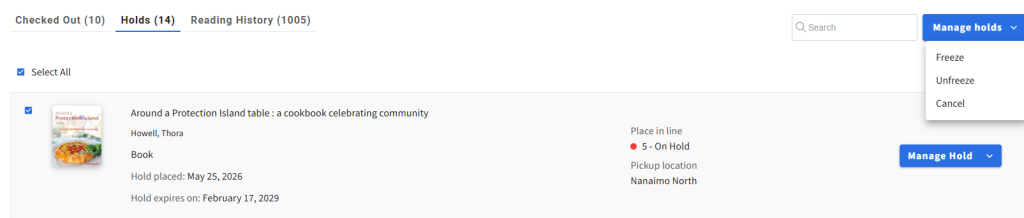
- Cancel Holds – Cancel all selected holds in a single action.
- Freeze Holds – Temporarily suspend selected holds while retaining their place in the queue.
- Unfreeze Holds – Resume selected frozen holds in a single action.
How can I enable my reading history?
- You have to turn it on: For privacy reasons, your reading history is off by default. If you want to use it, you need to switch it on.
- How to turn it on:
- In the Account Portal, select Account.
- Select Reading History: Opt-in under the library card.
- When prompted to confirm, select Yes, keep my history.
- Important: Books you borrowed before turning this feature on usually won’t show up.
- You can turn it off anytime: If you decide to turn it off, your saved reading history will be permanently deleted.
How do I renew items that are on loan?
- In the upgraded catalogue you can renew one title at a time OR do a batch renew on several loans at once.
- You can batch renew items that are overdue and/or due soon.
Why can't I renew an item?
- You cannot renew a title on the same date that you checked it out.
- Some formats are not eligible for renewals:
- Express Reads
- Express Views
- Magazines
- Reference material
- Interlibrary Loans
- You may not renew items if you owe more than $40.00 in fines and/or fees.
- If there is a hold queue for a title, you will not be able to renew an item.
Please take note that you can renew most of our titles 2 times.
Why aren’t the Overdrive/Libby magazines I borrowed in the catalogue visible in Overdrive/Libby?
Unlike eBooks and eAudiobooks, OverDrive/Libby magazine checkouts and subscriptions are specific to the device (not the card) and do not sync between devices. Libby can be set to sync magazines between devices using a setup code, but will not synch to the catalogue.
Why is the library collecting cookies?
- As part of our commitment to transparency and privacy protection, the catalogue requests your consent for the use of cookies. Once you consent, the OneTrust banner will no longer appear during subsequent sessions. The catalogue functionality remains unaffected regardless of your cookie preferences.
- We believe that by allowing you to control your cookie preferences, we enhance transparency and enable you to make choices that align with your privacy preferences. We prioritize user privacy and aim to provide a secure and transparent user experience.
- The catalogue uses cookies to do the following:
- Load balance Innovative servers
- Verify sessions
- Track the cookie banner
- If your site has cookies that you can manage, they’re listed on the Cookie Preferences page.